Microsoft 365 and Entra ID Identity Hardening Guide
A practitioner guide to securing Microsoft 365 tenants against OAuth consent hijacks, credential theft, and identity-based attacks that bypass traditional endpoint defenses.
Executive Summary
Identity is the new perimeter. Modern attacks like ConsentFix bypass endpoint defenses entirely by exploiting OAuth consent flows and trusted first-party applications. This guide provides actionable hardening steps for Microsoft 365 and Entra ID environments, organized by priority and mapped to sector-specific implementation considerations.
1. The Identity Threat Landscape
Microsoft 365 and Entra ID form the identity backbone for most organizations. When attackers compromise these systems, they gain access to email, documents, collaboration tools, and often administrative capabilities across the entire environment. Traditional endpoint detection is ineffective against browser-native identity attacks that never touch the file system.
The shift from malware-based attacks to identity-based attacks reflects attacker economics: why exploit vulnerabilities when you can simply ask for access? OAuth consent flows, federated authentication, and trusted first-party applications create legitimate-looking access paths that defenders struggle to distinguish from normal operations.
2. How ConsentFix Attacks Work
ConsentFix represents a new class of identity attacks that blend social engineering with legitimate OAuth flows. Unlike traditional phishing that steals passwords, ConsentFix exploits the trust relationship between users and Microsoft's own authentication infrastructure.
The Attack Chain
Lure Delivery
A compromised or malicious webpage displays a fake Cloudflare Turnstile-style challenge requesting a work email address. If the address matches the target list, the victim proceeds.
OAuth Initiation
The lure opens a legitimate Microsoft login window pre-seeded with the Azure CLI client ID, a first-party app that cannot be blocked by default.
Silent Consent
With existing browser sessions, users often see no password prompt or MFA challenge. A single click grants consent and redirects to localhost with an authorization code.
Token Extraction
The attacker convinces the victim to copy or drag the localhost URL back to the lure page. The code is exchanged for refresh and access tokens, granting full tenant access.
Why This Bypass Feels Invisible
- Trusted first-party app: Azure CLI is implicitly trusted and requires no admin consent prompts
- Minimal user friction: Existing cookies enable one-click redirect; no malware touches the endpoint
- Browser-only artifacts: The only traces are a Microsoft login in browser history and a brief localhost error page
3. OAuth Governance Controls
OAuth governance is the foundation of identity security in Microsoft 365. These controls determine which applications can access tenant data and under what conditions.
App Consent Policies
- Require admin consent for first-party apps where policy allows
- Disable user consent for multi-tenant apps; pre-approve only what business workflows need
- Review and revoke unnecessary application permissions quarterly
- Implement an admin consent workflow for user-requested apps
Monitoring and Alerting
- Monitor sign-ins and token exchanges from Microsoft Azure CLI app ID
- Alert on new service principal registrations
- Track unexpected refresh token issuances
- Review risky sign-ins flagged by Identity Protection
4. Conditional Access Policies
Conditional Access is the policy engine that enforces Zero Trust principles in Entra ID. Properly configured policies can block or challenge OAuth flows that originate from unexpected contexts.
High Priority Policies
- Block OAuth flows from unfamiliar locations or devices
- Require phishing-resistant MFA for all admin roles
- Enforce device compliance for sensitive app access
- Block legacy authentication protocols
Token Protection
- Enable token protection (preview) for sensitive apps
- Apply sign-in risk policies to challenge suspicious sessions
- Configure session lifetime policies for admin accounts
- Require re-authentication for privileged operations
5. Detection and Response
Even with strong preventive controls, detection capabilities are essential. Identity attacks leave subtle traces that require specific hunting queries and alert configurations.
Detection Priorities
Sign-in Anomalies
Hunt for sign-ins showing Application: Microsoft Azure CLI or Azure Resource Manager from unexpected locations or devices.
Token Abuse Indicators
Alert on refresh token usage from new IP addresses or impossible travel scenarios that suggest token theft.
User Reports
Review browser history or EDR telemetry when users report odd localhost pop-ups or unexpected authentication prompts.
6. Identifying Phishing Infrastructure Early
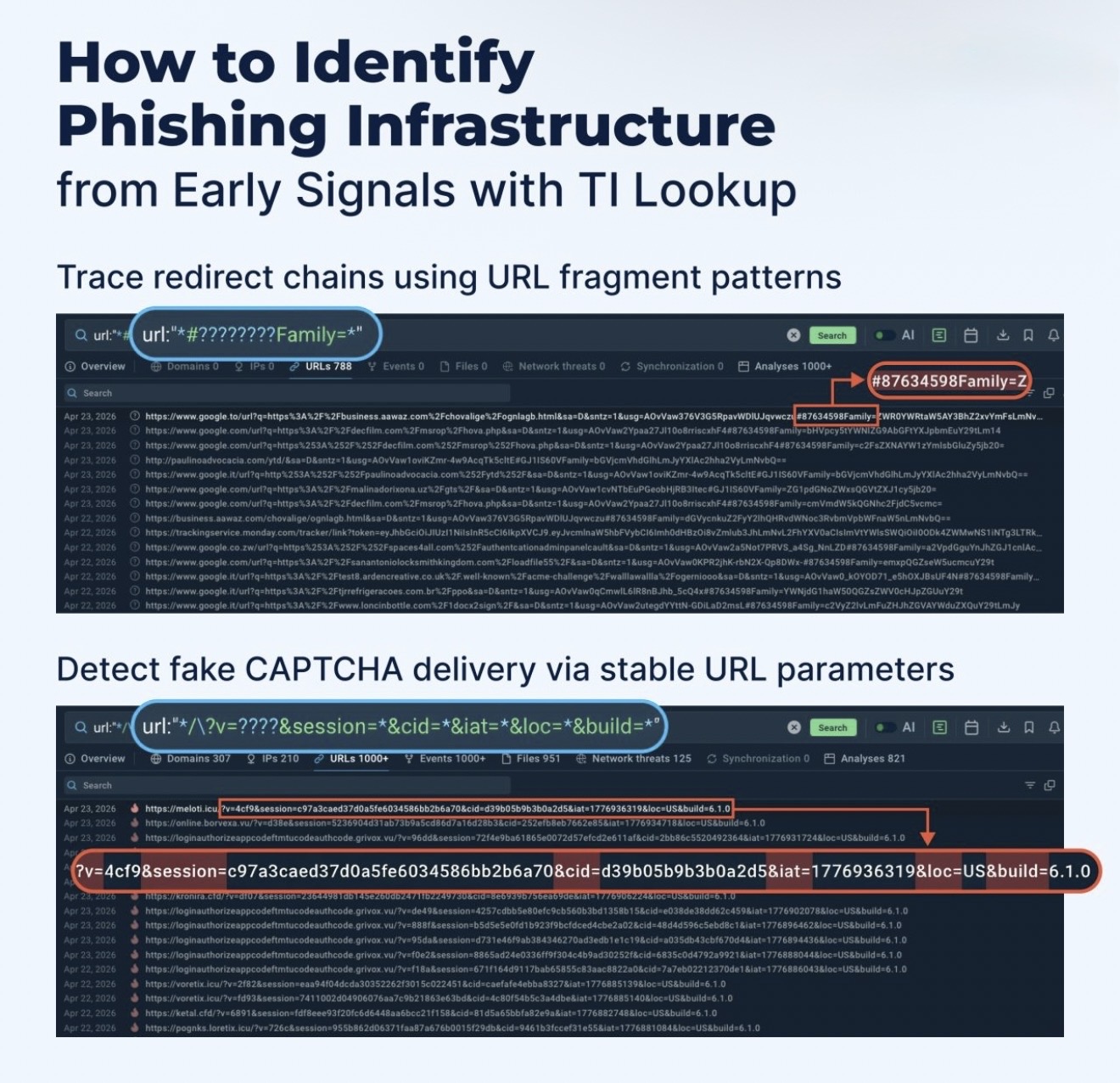
Phishing continues to bypass defenses not because teams lack tools, but because modern delivery paths are designed to erase signal before the final payload is reached. Redirect infrastructure, fake CAPTCHA stages, and rapidly changing delivery mechanisms make late-stage detection unreliable.
The operational advantage comes from identifying phishing earlier in the execution chain, while behavioral patterns are still stable. That gives SOC and MSSP teams a better chance to validate detections, shorten investigation time, and act on evidence before credentials are compromised.
7. Sector-Specific Applications
Microsoft 365 and Entra ID hardening priorities vary by industry. The following outlines how organizations across e-commerce, manufacturing, private equity, fintech, and solar energy should approach identity security based on their unique risk profiles.
E-Commerce and Retail
Identity Risk Profile
- High-volume seasonal contractors with temporary access
- Shared mailboxes for customer service teams
- Third-party integrations with inventory and fulfillment systems
- Marketing agencies with delegated admin access
- PCI scope extends to admin accounts handling cardholder data
Priority Hardening Actions
- Time-limited access for seasonal staff with automatic expiration
- Phishing-resistant MFA for all admin and shared accounts
- App consent restrictions for third-party marketing tools
- Conditional Access policies tied to device compliance
- Regular access reviews before peak shopping seasons
CPG and Manufacturing
Identity Risk Profile
- Plant managers with both IT and OT system access
- Vendor accounts for SCADA and HMI maintenance
- Federated identity with parent company or partners
- Service accounts connecting ERP to manufacturing systems
- Remote engineering access to production environments
Priority Hardening Actions
- Strict Conditional Access for accounts with OT-adjacent access
- Just-in-time access for vendor maintenance windows
- Service account inventory with credential rotation
- B2B collaboration policies restricting external sharing
- Identity Protection policies for high-risk sign-ins
Private Equity
Identity Risk Profile
- Diverse tenant configurations across portfolio companies
- Deal team access to sensitive M&A data rooms
- Consultant and advisor accounts with varying access levels
- Integration challenges during post-close transitions
- LP reporting systems with investor identity federation
Priority Hardening Actions
- Standardized Conditional Access baseline across portfolio
- Time-bound access for deal-specific data rooms
- Cross-tenant access policies for portfolio visibility
- Identity governance for consultant lifecycle management
- Privileged Identity Management for admin role activation
Fintech
Identity Risk Profile
- Developer access to payment processing systems
- Banking partner integration accounts
- Regulatory examiner access during audits
- Customer support with access to financial data
- API service accounts for core banking integrations
Priority Hardening Actions
- Phishing-resistant MFA mandatory for all production access
- Workload identity for API authentication instead of secrets
- Separation of duties enforced through access packages
- Detailed audit logging for SOC 2 and regulatory evidence
- Break-glass procedures with multi-party approval
Solar and Renewable Energy
Identity Risk Profile
- Field technicians with site-specific access requirements
- SCADA vendor accounts for remote monitoring
- Utility interconnection partners
- Asset management platforms with portfolio-wide access
- Investor reporting systems with LP identity integration
Priority Hardening Actions
- Location-based Conditional Access for site-specific systems
- Managed device requirements for OT-adjacent access
- Vendor identity governance with scheduled access reviews
- NERC CIP evidence collection from identity logs
- Emergency access procedures for site outages
8. Implementation Checklist
Use this checklist to prioritize identity hardening efforts. Items are ordered by impact and implementation complexity.
CRITICALImmediate Actions
- Enable phishing-resistant MFA for all admin accounts
- Block legacy authentication protocols
- Disable user consent for multi-tenant applications
- Enable Identity Protection with automated response policies
HIGHNear-Term Priorities
- Implement Conditional Access policies for sensitive apps
- Configure alerting for Azure CLI sign-ins
- Review and revoke unnecessary application permissions
- Deploy Privileged Identity Management for admin roles
MEDIUMOngoing Governance
- Establish quarterly access reviews for all privileged accounts
- Implement admin consent workflow for user-requested apps
- Enable token protection for sensitive workloads
- Document break-glass procedures and test recovery
SecureStepPartner Perspective
Identity attacks are increasingly browser-native and invisible to endpoint defenses. Treat OAuth governance and Conditional Access tuning as first-class security projects, not afterthoughts. The organizations that mature their identity security posture now will be better positioned to adopt passkeys, workload identity, and other emerging controls as they become available.
Related Insights
Request an Identity Hardening Review
Validate your Microsoft 365 and Entra ID defenses against ConsentFix-style OAuth hijacks before attackers validate them for you.